
Guide
Connect once, switch on what you need, press one key
Each section is a few things to press and one line that tells you it worked. Do setup in order, then go to the tab you have open.
Your class
Showing every section. Pick your class to hide the ones that are not for it.
Your first run
Four steps from a fresh install to a bot that attacks.
- Connect the client
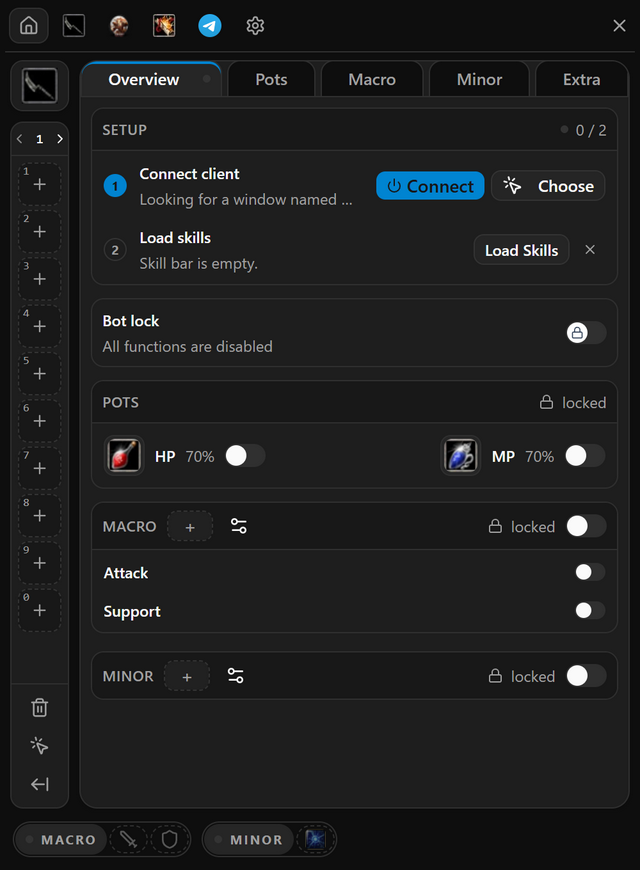
Game open and logged in, then Connect on the setup card.
Done when the first row gets a tick.
- Load your skills
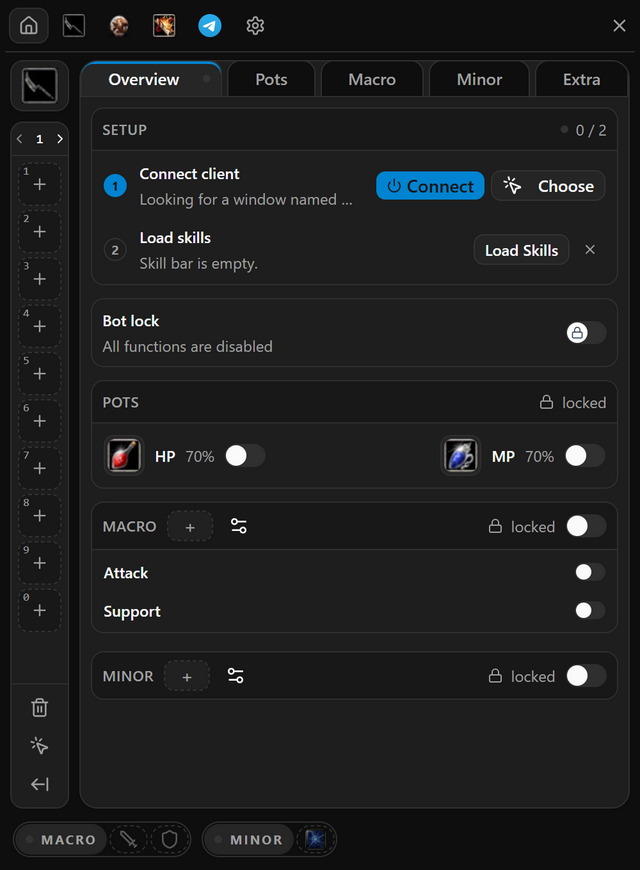
Skills on your in-game bar, then Load Skills.
Done when the card reads Ready.
- Pick a combo
On Macro, choose a combo and switch on Attack loop.
Done when its slots are filled.
- Press your bot key
Open the bot lock with Del, set a key on the Macro box and switch the box on.
Done when MACRO turns amber.
Contents
Setup
Do these four in order. Each one needs the one before it.
Install and Sign In
Gets Hector onto your computer and into your account, with the token from your purchase or a free trial code.
- Download Hector and run the installer.
- Bought a plan? Press Sign up and enter your email, a password and the Token we emailed you.
- Have a free trial code? Press Activate free trial instead and enter the 6-digit code.
- From then on, sign in with your email and password.
- When it works
- A small strip opens on your screen. That is the widget, and its Hector logo opens the menu.
- If it does not
- Seeing Maximum connections reached? Press Close it and sign in to close your other session.
Connect the Client
In the program: Bot settingsOverview
Hector plays on the game window you connect. Nothing else in this guide works until this is done.
- Start Knight Online and log in with the character you want Hector to play.
- Click the Hector logo on the widget to open the menu. Until setup is done, it opens on Overview.
- Press Connect on the first row of the setup card.
- If your game is not found, press Choose and click the game window with the middle mouse button.
- When it works
- The first row of the setup card gets a tick and shows your client.
- If it does not
- Hector remembers the window you pick with Choose, so next time Connect finds it on its own.
Auto Read Skill Bar
In the program: Bot settingsOverview
Hector needs to know which skill sits on which key. It learns that by reading the skill bar in your game.
- In the game, put every skill and pot you use on your skill bar.
- Press Load Skills on the second row of the setup card.
- Compare the skill bar down the left side of the menu with the one in your game.
- Missing one? Press the arrow under that bar to open the skills list, then right-click the skill to add it. Ctrl-click a skill on the bar to remove it.
- When it works
- The setup card reads Ready and counts your skills.
- If it does not
- Changed your skill bar in the game? Press Reload skills on the setup card to read it again.
Start and Stop the Bot
In the program: Bot settingsOverview
One key starts everything in the Macro box, and the same key stops it. The bot lock above it has to be open first.
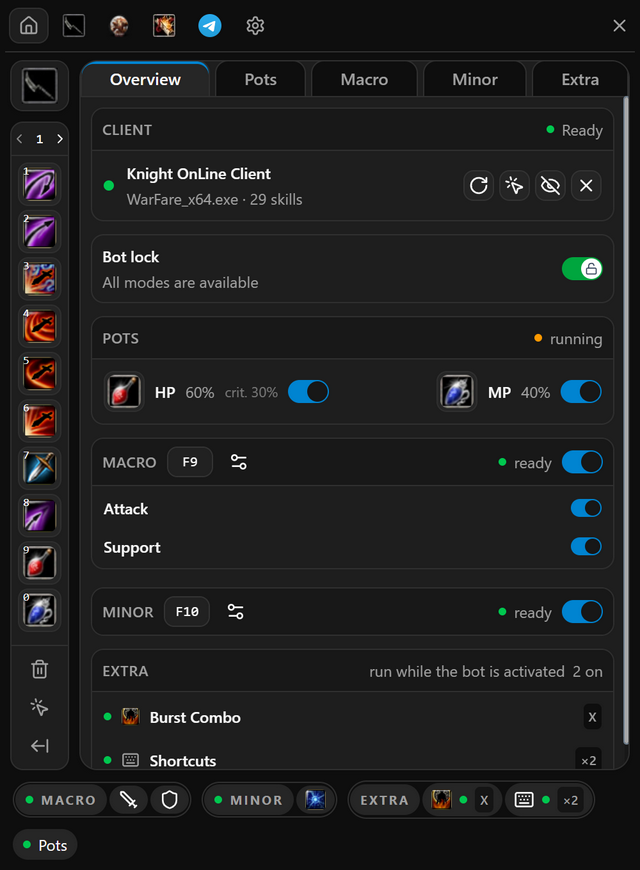
- Switch on Bot lock, or press Del. The line under it changes to All modes are available.
- On the Macro box, click the empty key box and press the key or mouse button you want.
- Switch the Macro box on, then switch on what the key should start: Attack, Support and, on a priest, Heal.
- Go to the game and press your key. Press it again to stop.
- When it works
- MACRO on the bar at the bottom of the menu turns amber while the bot runs.
- If it does not
- The key does nothing while the Macro box, or every row inside it, is off. Switch them on and press it again.
Pots
Pots work whenever the bot lock is open, whether the bot is running or not.
Auto HP/MP Pot
In the program: Bot settingsPots
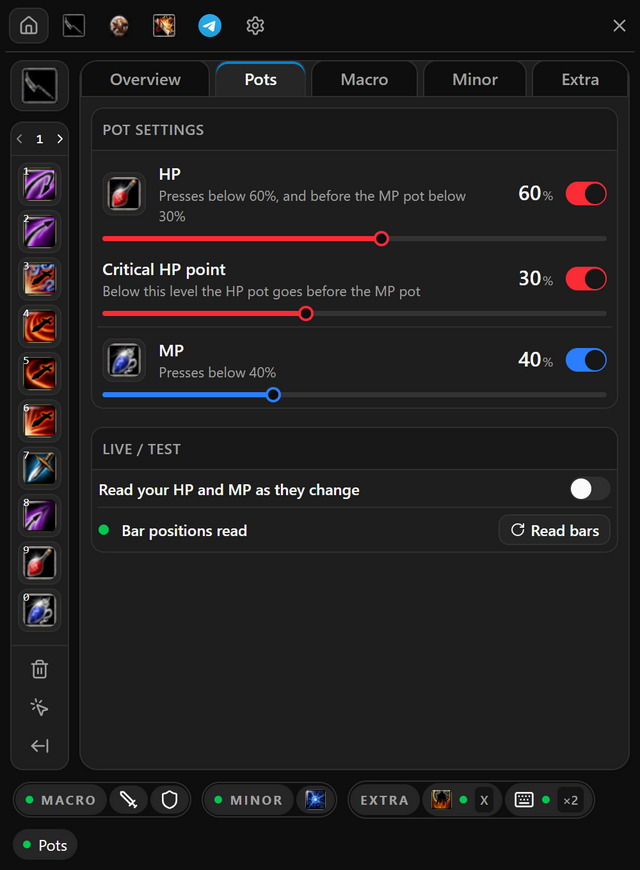
Drinks a pot when your HP or MP drops below the percentage you set. HP and MP each have their own line.
- Put your HP and MP pots on your skill bar and load skills.
- Open Pots and switch on HP, MP or both. The bot lock has to be open.
- Drag each slider to the percentage that pot is drunk at.
- To drink HP before MP when your health gets low, switch on Critical HP point and set its line.
- When it works
- Switch on Live / Test and click into the game. The live bars follow your HP and MP as they change.
- If it does not
- A note says the bars were read partly empty? Fill HP and MP in the game, then press Read bars.
Macro
Everything your bot key starts. Set up the parts you use and switch them on.
Auto Attack
In the program: Bot settingsMacro
Presses your combo while the bot runs. You pick the combo, its skills and its speed.
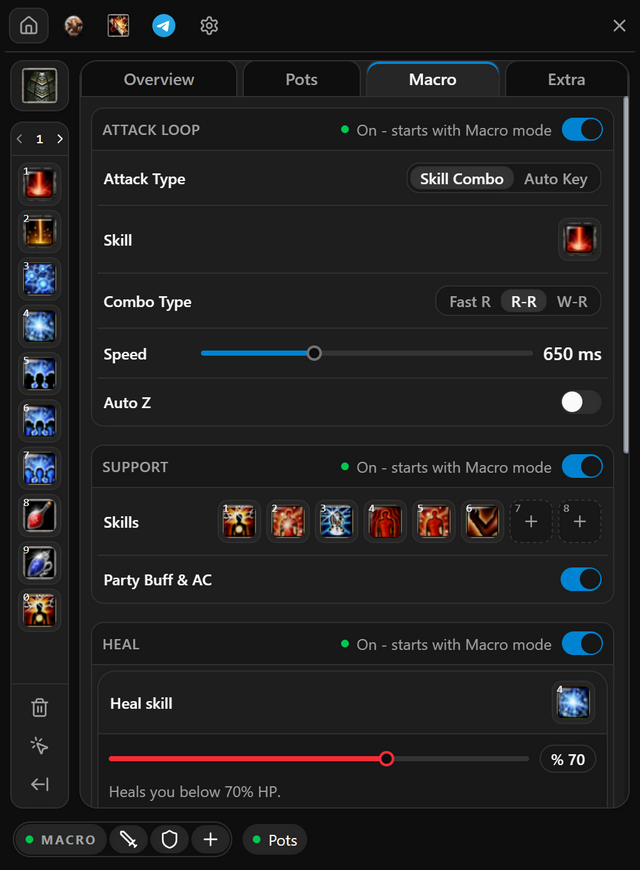
- Open Macro and pick a combo under Attack Type. Your class decides which ones you see.
- Right-click a skill on the skill bar to put it in the combo. Ctrl-click a slot to empty it.
- Set Speed. A lower number presses faster.
- Switch on Attack loop at the top of the group.
Your class's combos
 ARCHER
3-5 Combo, 72 Combo or Auto Key. To add Blow Arrow, click it in its slot, then choose Before or After.
 ASSAS
ASSASAsas Combo or Auto Key. Asas Combo presses the order you build on the Assas settings tab: press Set Assas skills to open it.
 WARRIOR
Skill Combo or Auto Key. The echo combo has a key of its own on the Extra tab.
 MAGE
MAGEStaff Combo, 18 + Skill Combo or Auto Key. In Staff Combo, click the manes skill in the second slot to add manes.
 PRIEST
Skill Combo or Auto Key. Heal and support are set up on the same tab.
- When it works
- While the bot runs, the Attack loop header reads Running.
- If it does not
- A skill with an amber dot is not on your skill bar and cannot be pressed. Put it on the bar and reload skills.
Auto Support
In the program: Bot settingsMacro
Keeps your buffs up while the bot runs. Each slot is cast again as it runs out or comes off cooldown.
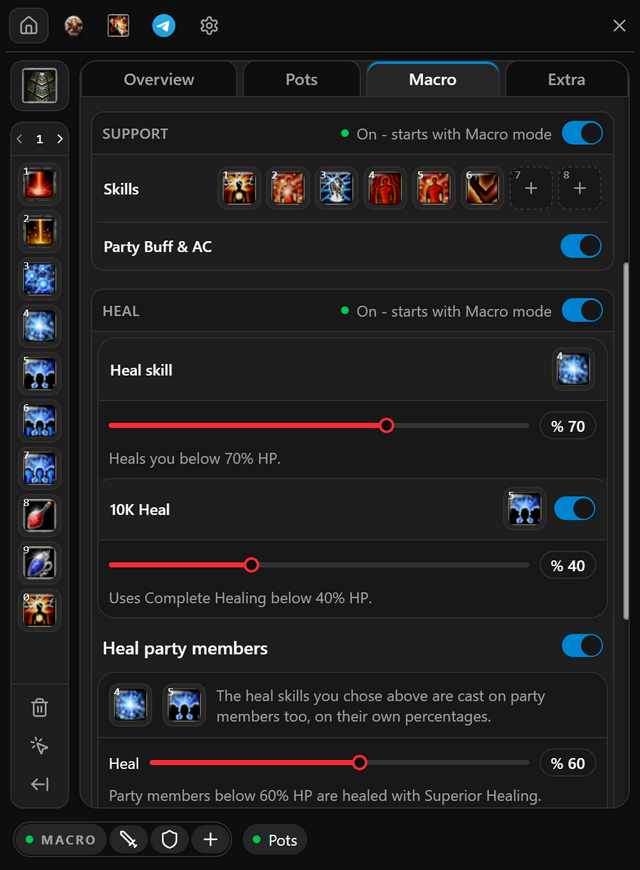
- Open Macro and right-click each buff or scroll on the skill bar. It lands in the first free Support slot.
- Drag slots to change the order. Ctrl-click a slot to empty it.
- Switch on Support at the top of the group.
For your class
- WARRIOR
Set Use HP Booster to the HP percentage HP Booster is used at.
- PRIEST
Switch on Party Buff & AC to buff your party as well.
- When it works
- While the bot runs, the Support header reads Running.
- If it does not
- A slot with an amber dot holds a skill that is not on your skill bar. Put it there and reload skills.
Auto Heal
In the program: Bot settingsMacro
Heals you when your HP drops, and your party too once you switch that on.
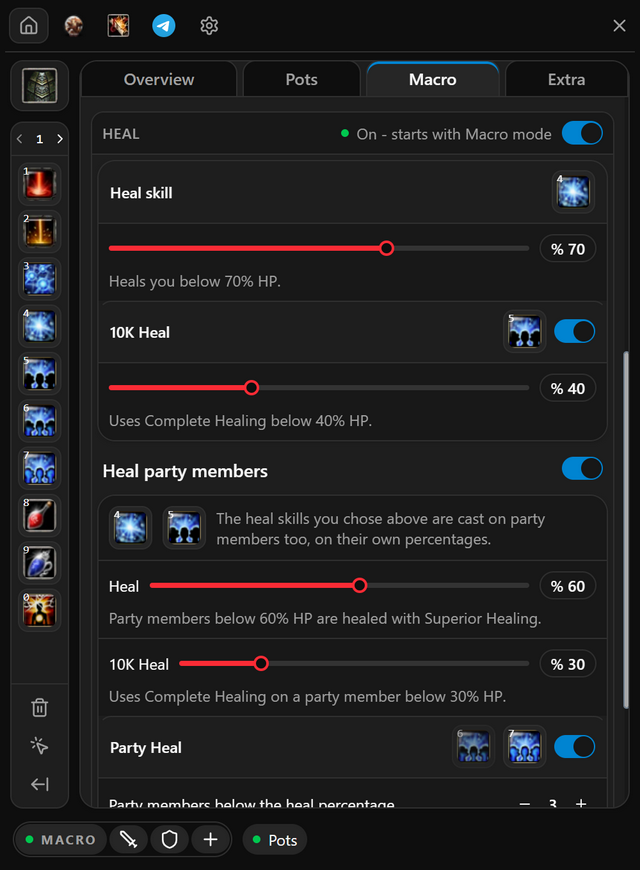
- Open Macro and right-click Massive Healing or Superior Healing on the skill bar. It becomes your Heal skill.
- Drag the slider under it to the HP percentage you are healed at.
- Switch on 10K Heal to use Complete Healing below its own percentage.
- For the party, switch on Heal party members. Add Party Heal to cast a group heal once enough of them are low.
- Switch on Heal at the top of the group.
- When it works
- The sentence at the bottom of the group says who is healed, when, and with which key.
- If it does not
- A line saying a skill is not on the skill bar means it will never be cast. Put it on the bar and reload skills.
Minor
Archers and assassins. The minor has a key of its own and runs apart from the bot.
Auto Minor
In the program: Bot settingsMinor
Presses your minor on a key of its own, all the time or only when your HP drops.
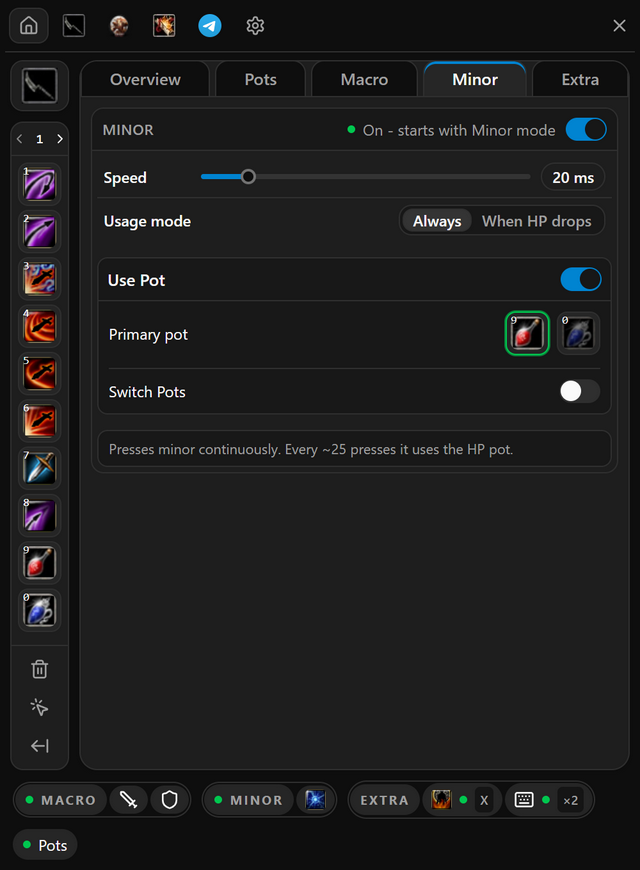
- On Overview, click the empty key box on the Minor box and press the key you want.
- Open Minor and choose Always or When HP drops under Usage mode.
- In Always mode it can drink pots too: switch on Use Pot and pick the Primary pot.
- Switch Minor on, then press your minor key in the game. Press it again to stop.
- When it works
- The sentence at the bottom of the tab says what the minor will do. If it is not what you want, a setting above it is wrong.
- If it does not
- The minor key does nothing while the bot lock is closed. Press Del first.
Extra
Keys that work on their own while the bot lock is open, whether the bot is running or not.
Special Modes
In the program: Bot settingsExtra
Combos your class fires on a key of their own. They work while the bot lock is open, whether the bot is running or not.
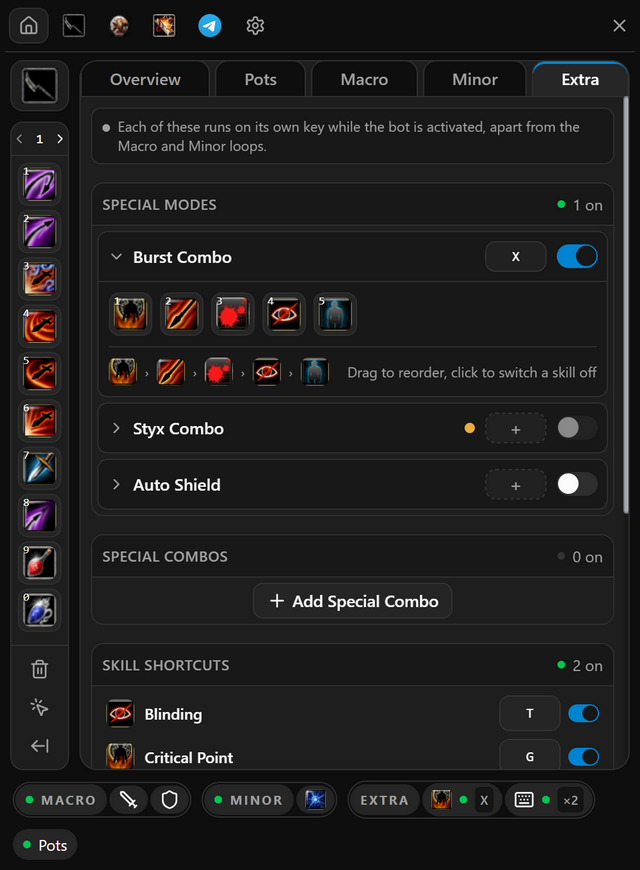
- Open Extra and click your combo under Special modes to unfold it.
- Click its empty key box and press the key you want.
- Click a skill in the combo to leave it out.
- Switch the combo on, then press its key in the game.
Your class's special modes
- ARCHER
Ice Styx LR Combo, Burst Combo and Styx Combo, each on its own key. Drag skills to change their order.
- ASSAS
Burst Combo while your Attack Type is Asas Combo, and Styx Combo. For Styx, press Load Inventory first, then pick your bow and an empty slot.
- WARRIOR
Echo Combo. Switch on Skip skills on cooldown so the combo moves on instead of waiting.
- When it works
- The combo shows under EXTRA on the bar at the bottom of the menu, with its key and a green dot.
- If it does not
- The switch will not turn on until a key is set and the skills in the combo are on your skill bar.
Auto Shield
In the program: Bot settingsExtra
Swaps your weapon for a shield when you are in danger, and back again once it passes.
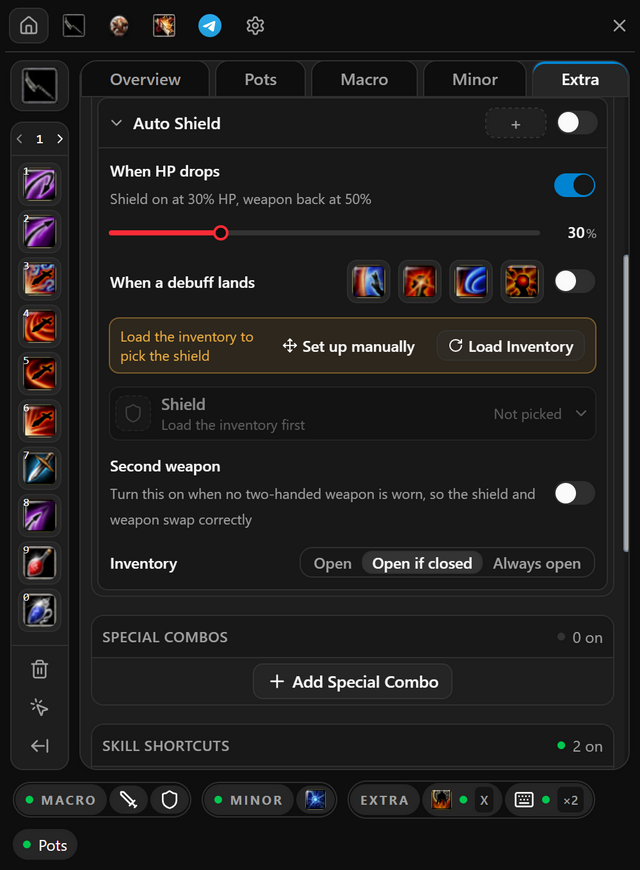
- Open Extra, click Auto Shield to unfold it, and press Load Inventory.
- Under Shield, pick the bag slot your shield is in.
- Switch on when it swaps: When HP drops or When a debuff lands. A priest can also shield While healing.
- Switch Auto Shield on. A key is optional, for swapping by hand.
- When it works
- It shows under EXTRA on the bar at the bottom of the menu, with a green dot.
- If it does not
- A red dot means it cannot swap yet. Pick the shield slot and switch on a trigger. When HP drops also needs your bars read on the Pots tab.
Skill Shortcuts
In the program: Bot settingsExtra
Puts a combo of your own skills on a key. One press casts them wherever they sit on your bar.
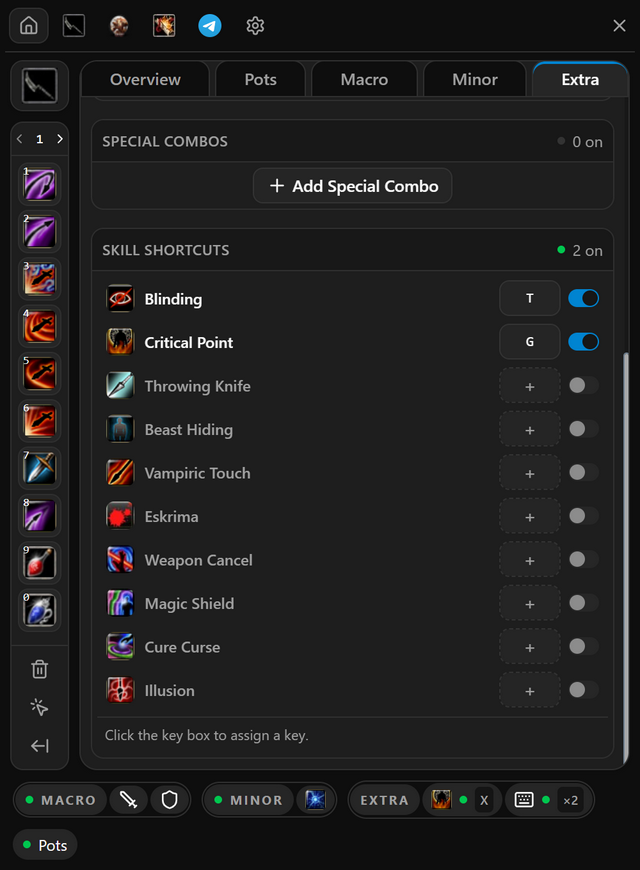
- Open Extra and press Add Special Combo.
- Right-click skills on the skill bar to add them to the highlighted combo, or drag them onto its + box. Ctrl-click a skill to remove it.
- Click its key box and press the key you want.
- Press that key in the game while the bot lock is open.
You can also put a single skill on a key: under Skill shortcuts, click the key box next to the skill and press a key.
- When it works
- The skills cast when you press the key, wherever they sit on your bar.
- If it does not
- A row marked not on skill bar cannot be pressed. Put the skill on your bar and reload skills.
Assas settings
Assassins only. The tab with the assassin icon, where the Asas Combo order is built.
Assassin Rotation
In the program:  Assas settings
The order Asas Combo presses your skills in: top to bottom, then round again.
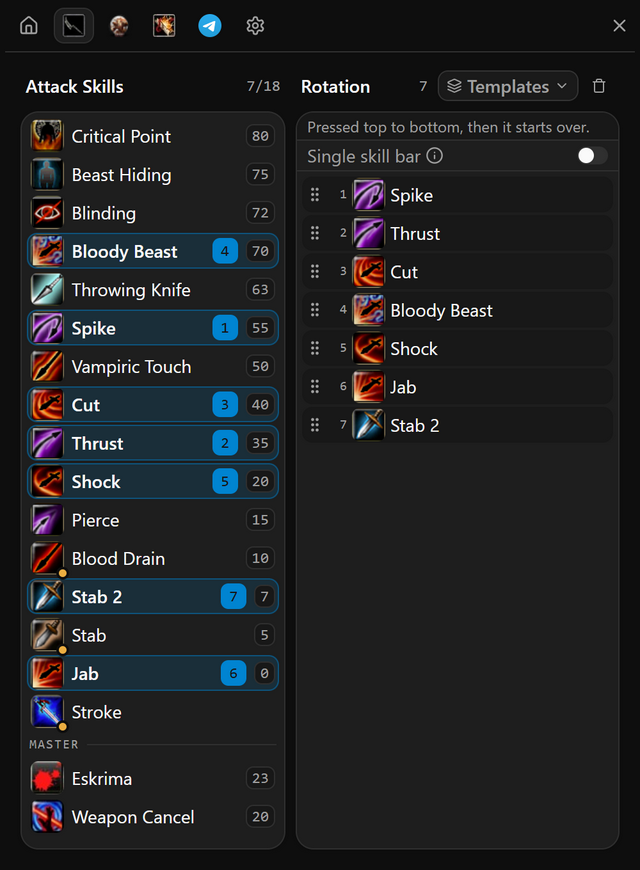
- On Macro, pick Asas Combo and press Set Assas skills. The Assas settings tab opens.
- Right-click skills on the left to add them to the Rotation, or open Templates and pick one of the Ready-made rotations.
- Drag rows to change the order. The trash icon on a row removes it.
- To keep this order for later, open Templates and press Save current rotation.
- When it works
- The rotation lists your skills in order, with no Not on your skill bar warning under it.
- If it does not
- Your game shows only one skill bar? Switch on Single skill bar.
Other tabs
Several clients at once, and item upgrade.
Multi Client
In the program:  Multi client
Runs up to five clients from one Hector. The bot plays the main client; the others you hide, rename or slow down.
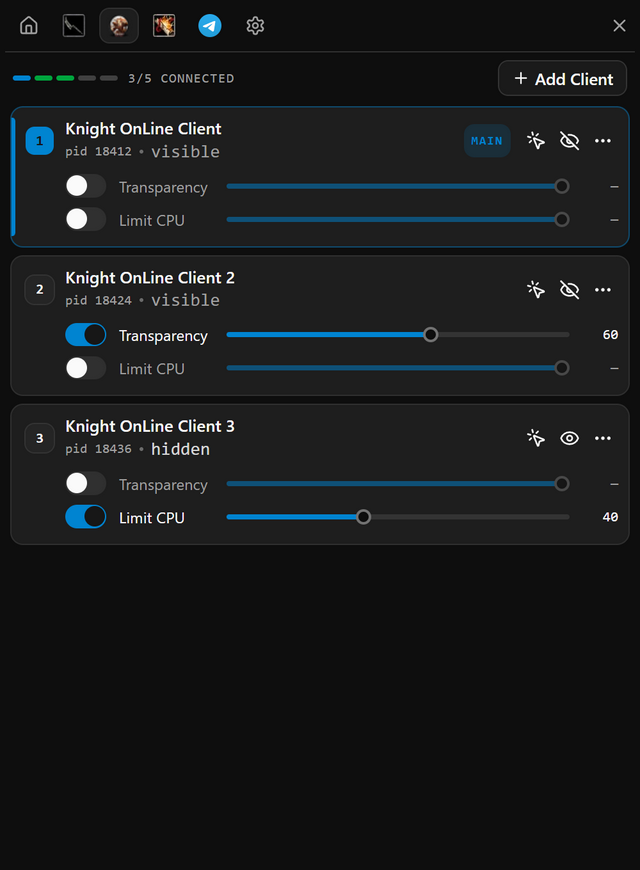
- Open Multi client and press Add Client for each extra game you run.
- On each new slot, press Choose and middle-click that game window.
- Click the number on the slot you want the bot to play. It becomes the main client.
- Limit CPU
Caps how much of your processor that client may use. Switch it on when several clients slow your computer down.
- Clear Memory
Frees the memory the client is holding on to, in one press. It is in the More actions menu.
- When it works
- The main slot carries the Main tag, and the header counts your connected clients.
- If it does not
- Changing the main client switches auto pot off. Switch it back on for the new one.
Auto Upgrade
In the program:  Upgrade
Upgrades the items you pick, for as many passes as you set.
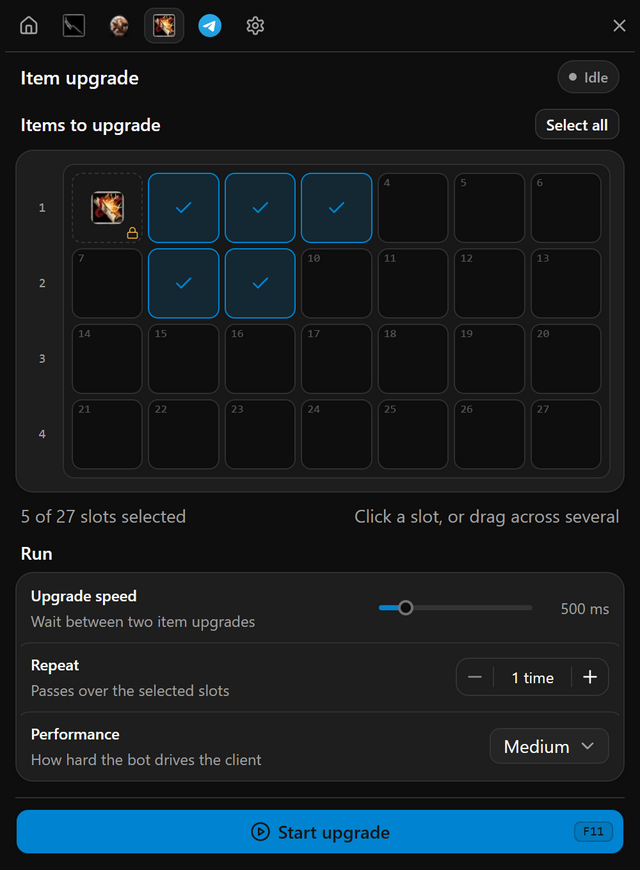
- Keep your upgrade stone in the top-left slot of your bag. Hector keeps that slot for it.
- Open Upgrade and click the slots holding the items to upgrade. Drag across several, or click a row number for the whole row.
- Set Repeat for the number of passes, and Upgrade speed for the wait between items.
- Press Start upgrade or F11. Press it again to stop.
- When it works
- The header reads Running, and the selection stays locked until the run ends.
- If it does not
- Nothing starts without a connected client and at least one selected slot.
Program settings
The gear icon, and the strip that stays on screen.
Cinema Mode
In the program: Program settingsGeneral
Hides the game window and Hector with one key, and brings them back with the same one. The bot carries on behind them.
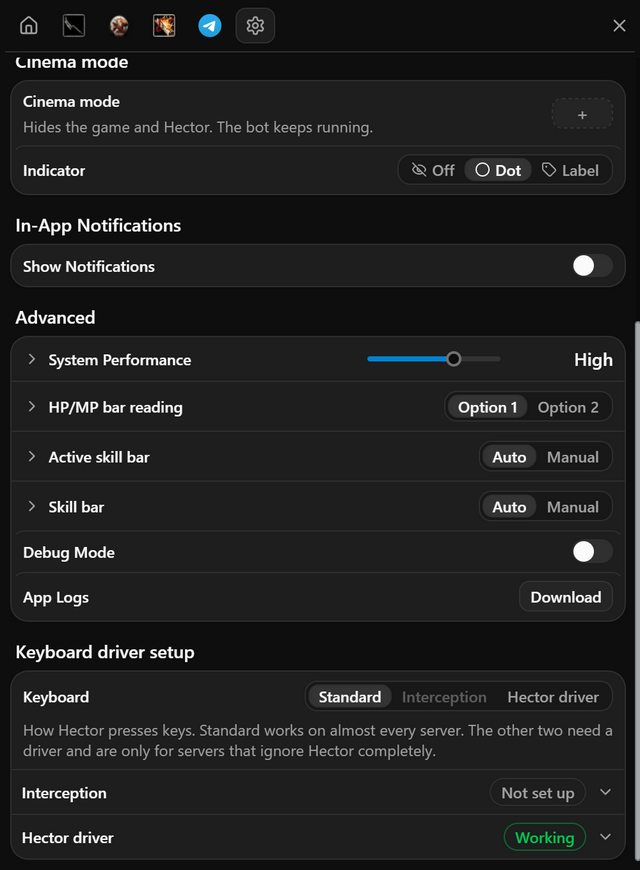
- Open Program settings, General. Under Cinema mode, click the key box and press a key.
- Pick what stays on screen under Indicator: Off, Dot or Label.
- Press the key. The game and Hector disappear, and the bot carries on.
- Press the key again to come back, or click the indicator.
- When it works
- With Label, a Cinema mode on pill sits in the top-right corner of your screen.
- If it does not
- Picked Off and forgot the key? Double-click the Hector icon in the Windows tray.
Profiles
In the program: Program settingsProfiles
Keeps your settings under a name, so you can switch between setups and share one by sending its id.
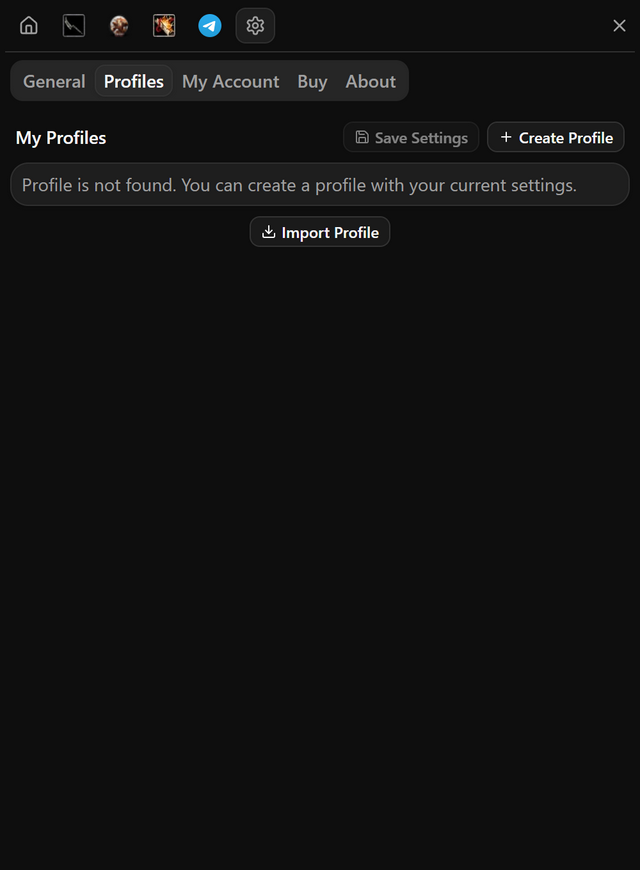
- Open Program settings, Profiles, and press Create Profile.
- After you change settings, press Save Settings.
- To share, press the share icon on a profile, then Copy to Clipboard, and send the id.
- To use someone else's, press Import Profile, paste their id and press Import.
- When it works
- The profile you are using is marked Selected.
- If it does not
- Importing overwrites your selected profile. To keep yours, create a new profile and select it first.
The Widget
The small strip that stays on screen after you sign in. It starts and stops things without opening the menu.
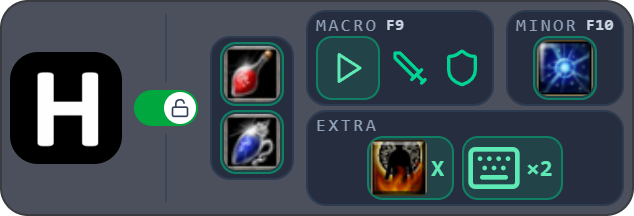
- Click the Hector logo to open or close the menu. Drag the logo to move the strip.
- The switch next to the logo is the bot lock, the same as Del.
- The pot pictures switch auto pot on and off. Macro and Minor each have their own start button.
- Right-click the strip to minimize Hector or close it.
- When it works
- Once a special mode or shortcut is on, an EXTRA card joins the strip with its key.
Help
For when something does not do what this guide says.
Something Not Working?
Find what you are seeing, then do what it says next to it.
- My keys do nothing in the game
- Open the bot lock with Del. Then check that the Macro box is on, and at least one row inside it.
- Connect cannot find my game
- Press Choose and middle-click the game window. Hector remembers it for next time.
- A skill is never used
- It is not on your skill bar. Put it there in the game, then press Reload skills on the setup card.
- Pots come too late, or never
- Fill HP and MP in the game, then press Read bars on the Pots tab.
- The skill bar never changes page, and my character never moves
- Open Program settings, General. Follow the Hector driver steps under Keyboard driver setup, then choose Hector driver under Keyboard.
- The minor key does nothing
- Open the bot lock with Del, and check that a key is set on the Minor box on Overview.